Thursday, October 30, 2014

Sunday, October 26, 2014
What are stripe payments
Stripe is a company that provides a way for individuals and businesses to accept payments over the Internet through their Stripe Payments interface.
It is providing an alternative to Paypal and other online payment systems and while quite new is being quite aggressive in its marketing and compatibility within other systems.
The beauty is that you can now use both Paypal and Stripe Payments and pick up more customers as Stripe allows for direct Credit Card Payments with none of the hassels that Paypal provides. It also works cross platform and cross device so you can use it to collect payments on mobiles and tablets.
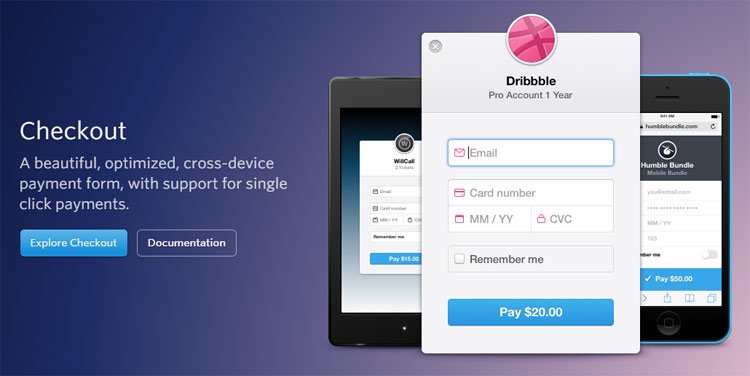
Stripe Payments VS Paypal
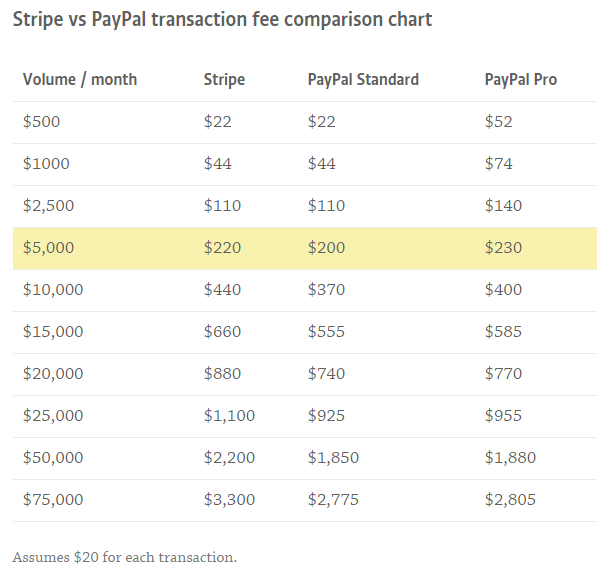
As you can see, $5,000 in monthly volume is an interesting data point. That’s right around where it starts becoming cheaper to use PayPal. Keep in mind, we’re not counting any of the service fees we discussed earlier, which would bring the PayPal costs up a bit.
When do I get paid?
PayPal usually pays out within 1 business day, while Stripe Payments takes 7 full days. If fast access to your funds is important, keep this in mind.
Update: USA Stripe customers now get faster two day transfers.
Security
Both Stripe Payments and PayPal take security seriously. At the core, they’re both very stable and secure platforms. Let’s talk about how they’re different, and how Stripe Payments intrinsically encourages good security.
Stripe’s killer feature when they first launched was Stripe.js. When you use Stripe.js on your website, the credit card data entered into your payment form is never sent to your server. Instead, the data is sent directly to Stripe. Why is this so important?
- Automatically PCI compliant because you don’t handle any sensitive credit card data on your servers.
- More secure because a breach of your servers won’t result in any stolen credit card data.
- You’re not tempted to store credit card data on your servers, which you really shouldn’t be doing unless you’re a big business and want to pay for PCI compliance.
If you follow the normal flow with Stripe Payments, you’ll just automatically store your cards in their vault. You’ll never touch the sensitive data. Thisencourages good security.
PayPal now has a way to store cards in a vault, but it isn’t quite the same as Stripe.js. The sensitive card data has to go through your servers, and this puts a big security burden (see PCI compliance above) on the software developer or the customer who has installed the software.
In summary, Stripe.js encourages good developer security practices, while PayPal gives developers room to make bad decisions. They’ve recently taken steps to provide better options, but these options still aren’t as secure as Stripe.js.
Stripe Payments in Other Programs
As stripe Payments grabs traction we see it popping up in many different programs.
I did an article a while ago re online accounting and telling you how I moved to a free accounting system called Wavapps and how we used stripe to collect payments. You can read the article here.
We have also incorporated in our Woo Commerce store where we sell a range of digital products. You can View the site here.
Plus you can get a number of plugins for your own site that allow you to use Stripe Payments for your payments.
Important Note: It is always suggested that when allowing people to enter their Credit Cards on your site that you use a good SSL Certificate and you can pick them up quite cheaply. To do this with a normal back will take hours and all sorts of fees an paperwork.
Stripe Payments For eCommerce
Irish co-founder John Collison, 24, says Stripe payments is aimed at helping businesses, particularly online start-ups, to quickly set up a way to get paid and will cut out the need for extra staff to maintain banking and payment relationships.
“It allows people to start accepting payments from anyone anywhere in their particular currency,” he says. “Online businesses are very fast moving and the last thing they have time for is to spend time setting up payments.”
Stripe Payments provides a “tech platform that businesses can build on”, giving the merchant a set of “application user interfaces”. Once incorporated into the businesses’ websites, these automatically set up the necessary links to payment options and to the merchants’ bank accounts, according to Collison.
Stripe Payments says it is now being used in 17 countries and is processing “billions of dollars” every year.
It will cost businesses 1.75 per cent plus 30¢ of each domestic transaction, and 2.90 per cent plus 30¢ for international and American Express transactions.
Want to learn more about how to set up your Online Business Then Click Here And also learn about Stripe Payments and Other eCommerce ideas
What are stripe payments
Tuesday, October 21, 2014
Call To Action for Website Conversion

We hear a lot about traffic and content on our websites however the secret is really about website conversion. And this all stems from a good call to action.
I have looked at a huge number of websites in my career and website conversion is something very few website owners seem to concentrate on and yet it is the life blood of any online business.
What is a Good Website Conversion Rate?
If you’re like 99.9999% of all online businesses, your conversion rate is below 3%, and quite likely below 1%. Imagine how much more you’d be making if your conversion rate was as high as Amazon where the lowest conversion rate is around 9.6%, even if you were not getting any more traffic.
What Factors Affect Website Conversion Rate?
Not every website can get a conversion rate that high. And the ones that do have a number of things in their favour:
Website Conversion depends on design and content – This is the easiest factor to change. Simply put some time,effort and budget into how well designed your website is and how compelling your content is.
We use a simple plugin called Call To Action Pro

Product – This is one of those simple-but-not-easy cases. The better your product, the more likely it is to get more sales.
Exceptional offers increase Website Conversion – People buy based on great offers, either real or perceived. Having a free trial for a service or free return shipping will dramatically lower a potential customer’s barriers to convert. Also, remember that it is all about perception – the never-ending “offer ends soon” hook works as well now as ever before.
Business model can effect website conversion– This is similar to the product, in that it is all about how compelled people are to buy your product or service. A website that sells books or last-minute flowers will convert much more easily than a furniture website.
Website Conversion with a Brand name – No-one doubts the integrity of Amazon, so they have no qualms about purchasing something off their website. A brand is built on both awareness and perception. A brand with a legendary reputation for low prices, exceptional service or amazing products eg Emirates or Singapore Airlines) will always outperform one that has a shoddy track record Jetstar or Tiger Airways.

Generate super qualified traffic for better Website Conversion – Your website conversion will be higher if your traffic generation strategy focuses on pulling in only super qualified traffic. This can be done by focusing only on long tail buying keywords with a PPC campaign. The downside of this is that you potentially lose a lot of short tail sales from sheer volume driving keywords.
You can also narrow down and save costs by using [website conversion] “website conversion” brackets and quotations. These are called exact and phrase match and only bring in qualified leads.
Repeat business and referrals is best for Website Conversion – people that have bought from you before (and are happy with you) will return to buy again. So don’t ignore the traffic that you have worked so hard to get in the first place. Keep them engaged with you by way of email marketing, follow up calls, social media and any other creative outlets you can think of.
Based on the factors above, the first thing you should realize is that a 10% conversion rate isn’t possible for everyone. Even if it’s possible for you though, the 10% conversion rate won’t happen overnight. It will take time, a huge investment in evolving your entire product offering and business and a lot of expertise. That may seem daunting to you, but always remember that progress is better than perfection. If you improved your conversion rate from 1% to 2%, that would double your online business. Isn’t that progress worth it?
So set some short and medium term goals and start picking off the lowest lying fruit – improving your conversion rate through relatively simple website re-designs, restructuring of content and A/B testing. These are also easy to outsource (to a degree), so get cracking!
To help you along you can get this great software to help you create calls to action and improve your website conversion in just minutes
Watch This video to see how this amazing tool can help you with your Website Conversion


Website Conversion For WordPress
Call To Action for Website Conversion
Sunday, October 19, 2014
Free Shopping Cart For Any Website
Discover How Using Mals Free eCommerce Shopping Cart You Can Turn Any Website Into A Complete Shopping Cart and Enlist Affiliates To Sell Your Products And Services!

Sell Tangible or Downloadable Products!
Hi. My name is Quentin Brown and for years I have been using Mal’s Shopping Cartfor a number of products and services.
The purpose of these videos tutorials are to take you from novice to experienced in just over an hour.
When I started I spent hours working everything out. I deliver digital products and could not get the download process figured out. Once I worked it all out is was easy.
Offline Marketers Add another Service
We now set up carts for many businesses and transpose their websites into a shopping cart by just adding some simple strategies we explain in the videos. This saves them lots of money because no need to buy additional software or pay for web developers to set up new systems
This is why I made these tutorials and actually use Mal’s Shopping Cart to deliver these tutorials and also provide an affiliate program to let you also sell the tutorials.
I will show you exactly how to set up your cart then intergrate it into any type of site making it a fully functional eCommerce site where you can sell just about anything that does not breech Mals terms of service.
You can also download the videos for later reference.
What Is Mal’s eCommerce Shopping Cart
Mal’s shopping Cart is a hosted system allowing you to simply add some form code to any website or blog to sell products and services. It also has a simple affiliate program allowing to to enlist affiliates to sell your products and services if desired.
Mal’s does not process the payments for you but provides various third party intergeneration like Paypal and a number of other processors or allows you to collect the Credit Card details over a secure network to process through your own merchant facility.
The basic system which will be more than enough for most businesses is free and with a small monthly payment you can use additional features.
Overview
If your good at setting this type of thing up then simply go to Mal’s eCommerce and go for it however if you would like to be guided through the process then these tutorials are for you.
We also provide you with 60 + codes you can copy and paste and use for your shop or site.
The videos are all made with Camtasia so you can watch over my sholder as I set up the shopping cart for this site. I will also show you how to intergrate into other types of sites and provide a lot of added information that should help you.
Here is a brief tutorial so you can check if you will be able to participate. If you can watch the video below you will be able to watch all the tutorials.
List of Topics Covered in the Tutorials
- Introduction – How to register your system and login
- Payment Methods – How to set up your payment gateways etc.
- Email Settings – Sending and receiving orders and how to customize
- Tax and Shipping - Esential for selling products
- Provide Discounts and Vouchers – Great way to promote products and services
- Customize the look and feel – make it look like your cart
- Advanced Settings – Creating a more interactive experience
- Digital Products – Selling digital products
- Affiliates – How to set up your own affiliate program
- Using mOrders – A desktop application for your orders
- Putting the cart in your website or Blog – Different code for your cart
- Marketing – ways to market your website
- New FREE Mobile Shopping Cart
Any one can transform their current website into a full blown eCommerce shop using Mals’ eCommerce shopping cart. Offline marketers, Online businesses in fact anyone can do this.
You get these free in our Site or you can buy separately Here
Free Shopping Cart For Any Website
Thursday, October 9, 2014
Blogging For Profit
Blogs are usually performed in a blogging platform like WordPress and other formats. They follow a standard format built around the content.

A good blog post has a number of characteristics that basically never change. This is because content is king and always will be.
No matter what your business a couple of posts a week can drive a lot of traffic to your site. Add to this if you post about 1 post a day for about 10 days it will train Google and they will come visit your site a lot quicker and also add you post to the search engine almost immediately.
Blogging For Profit Step 1 – Link Search Engines
The first thing to do is make sure your site is linked to Google and Bing webmaster and also that your sites xml site map is loaded in both places.
Blogging For Profit Step 2 – Your Title Will Make or Break Your Post
Your title will either encourage your readers to go further or simply turn them off. David Ogilvy once said, “On the average, five times as many people read the headline as read the body copy. When you have written your headline, you have spent eighty cents out of your dollar.”
Your title in a post is the same as a headline so if it does not capture them they wont go any further.
Blogging For Profit Step 3 – Lead Paragraph.
This is key. If you take too long on the wind-up, you will lose readers. You have to get into the premise of the post and make it relevant to your readers. This should contain your key phrase in the first sentence.
Blogging For Profit Step 4 – High Quality Relevant Image
Images are very important to your post just as they are in any advertising, magazine or paper. Not only will your image give substance to your post it will also be a key feature in your social bookmarks. Also in sites like pinterest, Flikr etc it will be the gateway to your post.
Make sure you give it a good name. something like video.png will not hack it. You need something like blogging-for-profit-video.png.
Blogging For Profit Step 5 – Make it Personal Where Possible.
Sharing personal experiences encourages the relationship. The best posts are based around stories. When I talk on the stage or write a post I try and be a story teller.
Blogging For Profit Step 6 – The Body
Everything to this point has been an introduction. I always try to make my main content scannable. I use bullets, numbered lists—and often both. This makes the content more accessible to readers and more sharable via Twitter and Facebook.
After The Post
Once the post has been completed always re read and make corrections and see that it reads nicely in one sitting.
Tags: Now that your post is finished you can add some tags. These can add a lot of value to your post and you can introduce some new key phrases.
Categories: Are a way to organize your posts into various areas like folders and the naming should also follow your main thrust of your overall site.
SEO: This is usually performed with a plugin like All in One SEO where you can add a title description and key phrases.
Comments: Most blogging platforms allow for comments which allow for interaction. Always make them moderated so you can control the conversation.
Sharing: This comes in two waves. Adding sharing buttons to your post allows for other to share on their social platforms.
The second from is to add the post to all your social networks which I suggest you set up. With programs like WordPress this can be automated to a certain extent.
Provide internal links: I can’t say everything in one post, so I link to other posts where I have developed a thought in more detail. This has the added vantage of increasing my pageviews and session times. I think it is also genuinely helpful to my readers.
At Web Marketing For Profit we can help teach you how to blog so just contact us.
Blogging For Profit
Tuesday, October 7, 2014
Free Business Wordpress and Hosting Account

Every customer gets a business grade Hosting account with CPanel
and Business WordPress site pre-loaded.
Here at Web Marketing For Profit we believe in providing everything a customer may need to either promote a current business online or to build a new online business.
Self Managed Business WordPress site and hosting
Web Marketing For Profit provides you with a fully self managed hosted business wordpress program. We have worked with many businesses who have set up their own website but have had little success in generating leads or sales from their efforts. By using our system we continuously help you get great results.
In this site we provide the system and the training to help you develop your own business WordPress website and all the different ways you can make it work. We do this through tutorials, live Q and A and some support. All this for just $25.00 a month.
Done For You
In our other site at http://wmfp.com.au we provide a full customized service where we do all the work for you. Some of our clients like us to put it all together for them then get us to manage the whole system and some like to help with input etc.
It is up to you how much you want to get involved in developing your business wordpress site.
Why do we use WordPress?
1. WordPress is now packed with standard features
Although WordPress has retained ease-of-use for a number of years, the features list has grown exponentially. Menu configuration and media handling are two good examples of things that have got steadily more powerful with no sacrifice made in usability. We like it so much we use it ourselves.
Your Business WordPress site is a competent Content Management System with a variety of enhancements it will adapt well to any business from simple product information right up to a fully customized eCommerce site. It can be used for social clubs to charity and mainstream organizations.
Most importantly it will grow with you.
2. The learning curve is quick and simple
Creating a new post in your business WordPress site and uploading some images is simplicity itself. Once learned it is almost the same to create pages. In fact most of our clients just use these two processes in their business wordpress site.
At the same time, however, there’s loads of functionality at your fingertips. It’s easy to ignore things you don’t understand, and then gradually learn more and more. By contrast, Joomla and Drupal, can have a beginners head spinning because they use complicated processes to do simple tasks.
3. The theme selection is impressive
There are thousands of great WordPress themes available, and many of them are completely free.

However, it’s at the premium (commercial) end of the market that things get really interesting. Some of the premium WordPress themes essentially work like Web design construction kits in their own right and give you the ability to create sites that look truly world class at an average price of about $50!
4. WordPress is easy to add eCommerce
Whether you are selling products directly from your site, or monetizing with ads and affiliate offers, your business WordPress site makes it easy.
Ads are easily inserted using widgets and eCommerce can be handled by a range of plugins including the popular WooCommerce.
5. There are some excellent plug-ins
Plugins add functionality to your business WordPress site and as long as you use ones that are well documented and supported you can do so many different things.
Best of all, you can usually find a free plugin to do most things perfectly well. Furthermore, most plugins are downloaded, installed and configured in a matter of minutes. WordPress’ emphasis on ease-of-use seems to have rubbed off on the plug-in writers!
Most are load and forget so you are free to work on the more important things in your business WordPress site.

6. Updates just keep coming
As WordPress is so popular, work on the platform never stops. While this sometimes means that keeping on top of updates feels like a never-ending job, it also makes for a system that’s constantly evolving and improving, with new functions being added all the time.
7. Support is second to none
As you would expect from such a popular platform, the support community is active and huge. Aside from the dedicated WordPress support resources, you’ll find an abundance of third-party forums and other options for assistance. If you have any question at all, you can be pretty sure that somebody has already answered it somewhere.
The beauty of this is that if we disappear you will have a huge army of people who can carry on your work.
8. SEO is made easy
WordPress is inherently quite SEO-friendly, with features such as the ability to automatically generate search-friendly URLS, but with the addition of a couple of plugins, such as the Google XML Site Map and the All-in-One SEO pack, you can force yourself to maintain good SEO discipline, giving your site the best chance of good search results.
Add to this how easy it is to use plugins to integrate with social networks, and a business WordPress site can perform very well in terms of modern SEO with quite minimal effort.

While we’re discussing WordPress, it’s important to note the distinction between WordPress.COM and WordPress.ORG.
WordPress.COM is a hosted blogging platform. It’s completely free to use, and it’s easy to get started. However, your website will have an address like www.yourpersonalblog.wordpress.com
There are also various restrictions to WordPress.COM blogs. Although you can use affiliate links to make money promoting products, you are not allowed to place banner ads or sign up to third-party networks such as Google AdSense.
In addition, WordPress.COM restricts you from using advanced (premium) themes and limits the number of plug-ins you can use. It should be seen as a “starter pack” and not as the foundation for a major Web project.
WordPress.ORG is where you can download a stand alone wordpress file and uses exactly the same framework but is installed on your own Web hosting space (Except we will do it for you).
A business WordPress site is completely your own, and you are free
to sell advertising and use it exactly as you wish.
If you’ve yet to try WordPress, we seriously recommend you give it a go. If it’s been a while since you worked on a website, you will find what you can do with such a simple interface truly staggering.
Summary
A business WordPress site and hosting package that is included with your Web Marketing For Profit subscription is great if you want to manage it all yourself with our full support.
Its not just a course its a resource
Join the Web Marketing For Profit Institute
Today For Training And Coaching for Your Business
Only $25.00 USD A Month
With Hosting and WordPress Installed

Once you have paid you will be Sent an email with your invitation
code to your online business training and link to the sign up form and Get Instant Access.

Save by paying yearly on our Alternative Payment Schedule
Business WordPress Site With
Business Grade Hosting
Free Business Wordpress and Hosting Account